How to Pay for Your NBI Clearance Easily Using GCash in 2026
Pay for Your NBI Clearance Easily Using GCash is quick and simple. First, register online at the official NBI website or through MyEG. When applying, choose GCash as your payment method and get your reference number.
Next, open your GCash app, go to “Pay Bills,” select “Government,” then “NBI.” Enter your reference number and confirm the payment. Don’t forget to save or screenshot the confirmation and reference number for your NBI appointment.
What You Need Before You Start
Before you pay for your NBI clearance, make sure you have:
- Your reference number from your NBI online application
- At least ₱130 in your GCash wallet
- A good internet connection
- The GCash app installed and logged in
Having these ready makes your payment fast and easy.
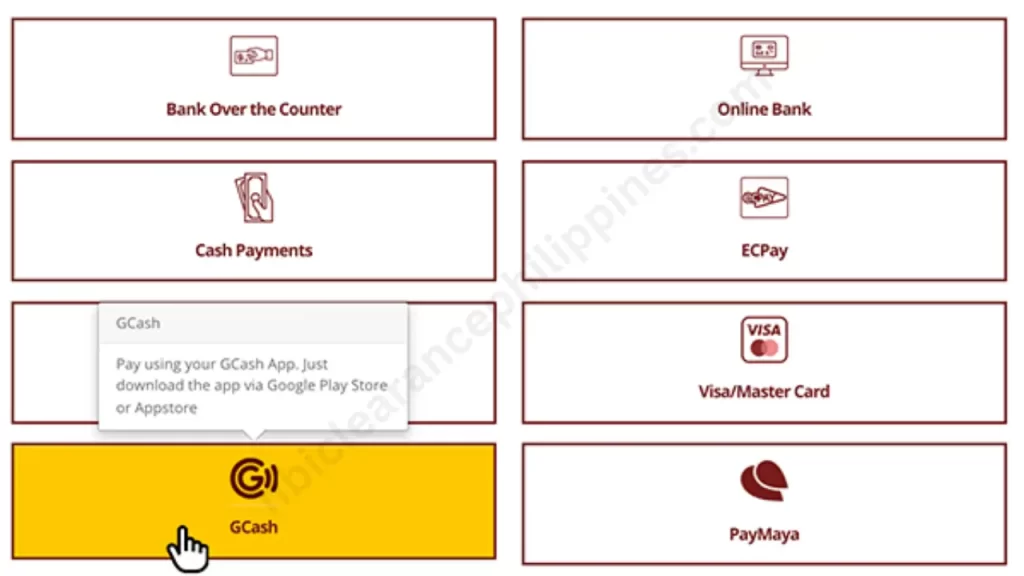
How to Pay NBI Clearance with GCash
Step 1: Open GCash
Open the GCash app on your phone and log in with your 4-digit MPIN.
Step 2: Go to Pay Bills
On the home screen, tap “Bills” or “Pay Bills.”
Step 3: Choose Government
Select “Government” from the list of categories.
Step 4: Select NBI
Find and tap “NBI” or “NBI Clearance.”
Step 5: Enter Payment Details
Type in the following:
- Your NBI reference number
- Amount: ₱130 for regular, ₱355 if paying online (includes service fee)
- Your contact number
- Your email for confirmation
Step 6: Check Your Details
Make sure everything is correct: reference number, amount, and contact info.
Step 7: Confirm Payment
Tap “Pay” or “Confirm Payment” to finish.
Step 8: Save Your Confirmation
You will get a message from GCash. Keep it safe—it is your receipt.
Other Ways to Pay NBI with GCash
1. Pay by QR Code at NBI or Payment Centers
If you are at an NBI office or payment center, you can pay using GCash and a QR code:
- Open the GCash app.
- Tap “Scan QR.”
- Point your phone camera at the QR code.
- Follow the steps on your screen to finish paying.
2. Pay Through the NBI Website
If you are applying online:
- Choose GCash as your payment option.
- A QR code will show on your screen.
- Open your GCash app and scan the code.
- Confirm the payment to complete it.
Important Reminders
1. Keep Your Confirmation Message
Do not delete the message from GCash. It is your proof that you paid. You might need it when getting your NBI clearance.
2. Payment Might Take Time
Sometimes it can take up to 24 hours for NBI to see your payment. If it says “pending payment,” just wait and check again later.
3. Check Your Reference Number
Always enter the right reference number from your application. A wrong number can delay or cancel your clearance.
4. Have Enough Money in GCash
Make sure your wallet has enough funds before paying. Normal payment is ₱130, but online service fees can make it ₱355.
Why Use GCash to Pay for NBI Clearance?
- Fast and easy – you can pay in just a few taps.
- Works anytime – 24/7 on your phone.
- No need to go out – no bank or payment center visit required.
- Instant receipt – your proof of payment is sent right away.
Using GCash for your NBI clearance is safe, simple, and saves time. You can do it all from home without any hassle.
How To Pay NBI Clearance Using GCash Without QR Code
Open your GCash app and go to “Pay Bills”, then choose “Government.”
Enter your reference number from your NBI application to find your payment.
Check the details, then confirm the payment using your GCash PIN.
This video provides a visual guide on How to Pay for Your NBI Clearance Easily Using GCash
How To Confirm If Payment Was Successful
- Look at your phone or email for a GCash confirmation message.
- Log in to the NBI Clearance website and see if it says “Paid.”
- Open your GCash app and check your transaction history.
- If it doesn’t show right away, wait a few minutes and refresh the NBI page.
Common Problems and How to Fix Them
- Payment not showing – Sometimes it takes up to 24 hours. Wait a little before asking for help.
- Wrong reference number – Always check your reference number before you submit.
- GCash app not working – Try updating the app or clearing the cache.
- Money taken but payment not done – Contact GCash Help Center or NBI Support. Give them your receipt and reference number.
If GCash Fails Than Try Alternative Payment Methods
If your GCash payment fails, you can still pay using:
- Maya (PayMaya)
- 7-Eleven via CLiQQ
- Bayad Center
- ECPay outlets
- Bank over-the-counter (BancNet partners)
GCash is still the easiest way. Just make sure your internet and balance are okay, then try again.
How to Create and Set Up Your GCash Account
Follow these simple steps to make a GCash account and pay your NBI clearance online:
- Download the GCash app on your phone and install it.
- Open the app and tap Register to make a new account.
- Enter your phone number and other basic details.
- Set a secure 4-digit PIN to keep your account safe.
- Add more details like your name and address.
- Verify your identity and tap Register.
Once your account is ready, you can easily pay your NBI clearance fees.
Tips for an Easy NBI Payment
- Make sure your internet is strong.
- Take a screenshot of your payment confirmation.
- Avoid paying late at night when GCash might be under maintenance.
- Use the same name on your GCash and NBI application.
- Check all details before confirming your payment.
A little care now can save a lot of trouble later.
FAQs
Can I pay my NBI clearance using GCash?
Yes! You can pay your NBI clearance using GCash. It is fast, safe, and easy. You can do it right from your phone without going to a bank or office.
Is GCash a valid payment method for NBI?
Yes! GCash is a valid way to pay for your NBI clearance. Payments through GCash are accepted and safe, and you get a digital receipt right away.
Can I use GCash as a payment method?
Yes! You can use GCash as a payment method. It is easy, safe, and fast, and you can pay directly from your phone.
How to use reference number in GCash?
To use your reference number in GCash, enter it when you pay for your NBI clearance. Make sure the number is correct so your payment goes through. It helps link your payment to your application.
Conclusion
Paying for your NBI clearance with GCash is fast, safe, and very easy. You can do it from your phone anytime without going to a bank or office. Just make sure you have your reference number, enough money in your wallet, and a good internet connection.
Remember to check your details, save your confirmation message, and follow all the steps carefully. If anything goes wrong, there are other payment options or ways to fix common problems. With a little care, your payment will be smooth and stress-free.